

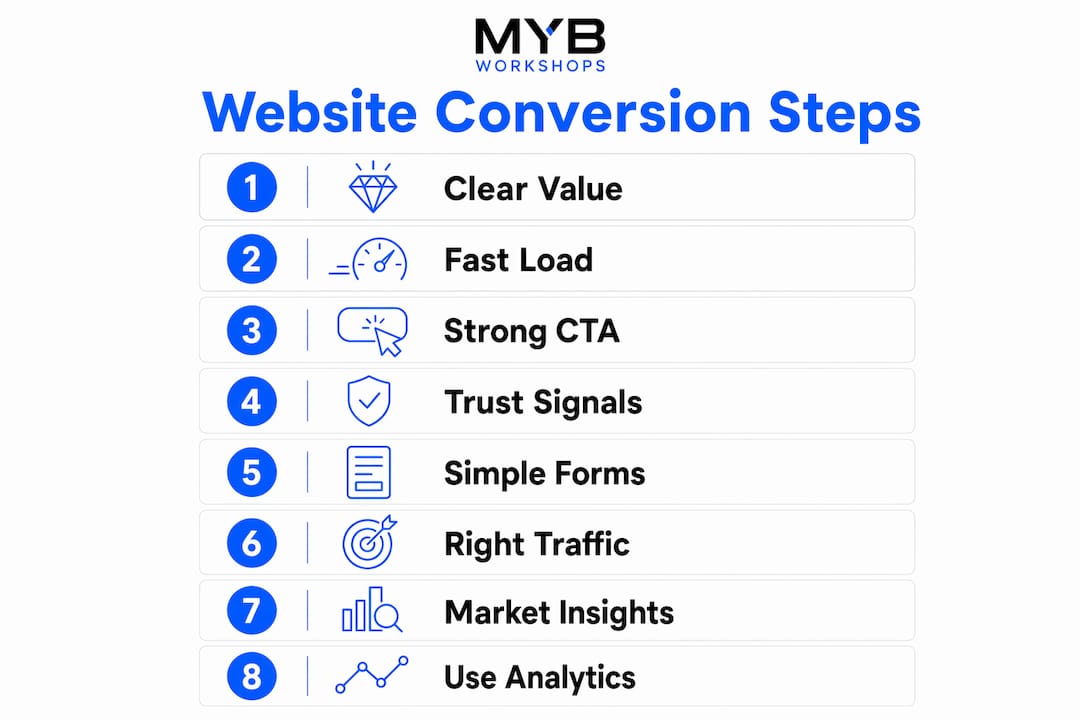
Most service business websites don’t have a traffic problem. They have a conversion problem. Visitors arrive, look around for a few seconds, and leave without calling, booking, or filling out a form. The reasons websites don’t convert usually aren’t mysterious. They’re a stack of small, fixable issues that add up to a site that confuses or fails to reassure the people most likely to buy.
Here’s what’s typically getting in the way:
Each of these is solvable. The sections below break down exactly what’s happening and what to do about it.
Visitors decide within seconds whether your site is worth their time. If your headline reads something like “Quality service you can trust” or “Serving the community since 2003,” you’ve already lost them. Those phrases tell a visitor nothing about what you do, where you do it, or why they should choose you over the next result on Google.
A strong value proposition answers three questions immediately: what do you offer, who is it for, and what outcome does the client get? For a service business, that might look like: “Bookkeeping for tradies in Brisbane — get your BAS done without the stress.” Specific, local, and outcome-focused.
To tighten your messaging:
A visitor should be able to name your service and location within five seconds of arriving. If they can’t, rewrite the hero section before touching anything else on the site.
A slow, confusing website is one of the most common causes of low conversion rates, and it’s often invisible to the business owner because they’re not the one trying to use it on a phone. Pages loading slowly experience notably lower conversion rates compared to faster-loading pages. That’s not a small gap.

The most common technical culprits are plugin overload, unoptimised images, and cheap shared hosting. A single unoptimized hero image can add significant seconds to your load time. Multiply that across a full site and you’re asking visitors to wait for content they haven’t decided they want yet.
Common UX issues that hurt conversions:
Pro Tip: Run your site through Google PageSpeed Insights and fix the top three issues it flags before making any other changes. Focus on mobile results first, since that’s where most of your visitors are coming from.
A call to action (CTA) is the instruction that tells a visitor what to do next. “Contact us” buried in the footer is not a CTA. It’s an afterthought. Visitors who are ready to act need a clear, visible prompt that meets them where they are on the page.

Effective CTAs for service businesses are specific and direct. “Get a free quote” outperforms “contact us” because it tells the visitor exactly what they’ll receive. “Book a 15-minute call” works better than “reach out” because it sets expectations and reduces uncertainty about what happens next.
What strong CTAs look like in practice:
Pro Tip: Test your site on your phone right now. Can you find the phone number or quote button without scrolling? If not, that’s your first fix.
Service businesses sell credibility before they sell the service itself. A visitor who doesn’t trust you won’t fill out your form, no matter how good your copy is. And trust isn’t built by saying “trusted” or “professional.” It’s built by showing real evidence.
Users often abandon forms due to length alone, but hesitation often starts earlier, when visitors reach the form and find no reassuring signals nearby. Reviews, licence numbers, years in business, and real photos of your team or work all reduce that hesitation.
Trust signals that work for Australian service businesses:
Place these signals close to your CTAs and forms, not halfway up the page where they’ve already been forgotten by the time someone reaches the button, as explained in this guide on optimising business profiles and reputation signals.
Friction in enquiry processes significantly lowers conversion effectiveness on Australian websites, and forms are the biggest source of that friction. Asking for twelve fields of information from someone who has never heard of your business before is the digital equivalent of interrogating a first-time customer at the door.
Overly complex, lengthy forms deter more than half of mobile local service leads. The fix isn’t complicated: ask for the minimum needed to have a useful follow-up conversation. Name, phone number, and a brief description of what they need is usually enough to get started.
Pro Tip: If your form feels like homework, fewer people will finish it. Read it back to yourself as if you’re a first-time visitor. If you’d hesitate, cut a field.
Sometimes the website itself is fine. The problem is who’s arriving. Mismatch between visitor intent and landing page messages causes early bounce and suppresses conversion regardless of how well the page is designed. A business running broad Google Ads keywords might attract plenty of clicks from people who were never going to buy.
Australian marketers often misinterpret low conversion as a lack of traffic rather than a misalignment between visitor intent and site message. More traffic to the wrong page, or from the wrong audience, doesn’t fix a conversion problem. It makes the numbers look worse.
Signs your traffic is misaligned:
The fix starts with reviewing your traffic sources in Google Analytics 4 (GA4) and checking which pages visitors land on and where they exit. Tighten your ad targeting, clean up your keyword list, and make sure each landing page matches the specific intent of the traffic arriving on it.
Average conversion rates for Australian service businesses mostly sit in the low single digits, with mid-single-digit rates indicating strong performance. That means for most service sites, the majority of visitors leave without taking action. The gap between average and high-performing pages comes down to value proposition clarity, load speed, and CTA specificity.
Mobile is where the biggest opportunity sits. The majority of Australian online shopping traffic originates from mobile devices, yet mobile conversion rates consistently trail desktop. The gap isn’t inevitable. It’s a UX problem, and it’s fixable.
| Conversion issue | Impact | Priority fix |
|---|---|---|
| Slow mobile load time | Conversion drops sharply beyond 2.4 seconds | Compress images, reduce scripts |
| Missing trust signals near form | Increases hesitation at decision point | Add reviews and credentials beside CTAs |
| Long or complex forms | Deters mobile leads significantly | Reduce to 3–5 fields, enable tap-to-call |
| Misaligned traffic | Inflates bounce rate, suppresses conversion | Audit GA4 by source and landing page |
| Vague value proposition | Visitors leave within seconds | Rewrite hero around service, location, outcome |
Pro Tip: Conversion rate optimisation is not a one-time redesign. It’s an ongoing process of testing, measuring, and refining based on real visitor behaviour. Start with the highest-traffic pages and work from there.
You can’t fix what you can’t see. Many service businesses have Google Analytics installed but aren’t actually using it to understand where visitors leave, which pages lead to enquiries, or how mobile users behave differently from desktop visitors. That’s like running a shop and never checking which products people pick up and put back down.
CRO is a continuous, data-driven process, and arbitrary design changes made without tracking data often harm conversions rather than help them. Tools like GA4 and Microsoft Clarity (free) show you exactly where visitors stop scrolling, which buttons they click, and where they abandon forms.
What to track as a minimum:
Set these up before making any changes to your site. Without this baseline, you’re guessing. With it, every decision you make is grounded in what your actual visitors are doing.
If you’ve read this far and recognised your own site in several of these points, you’re not alone. Most service business owners built their website to look good, not to convert. The good news is that the fixes are learnable, and you don’t need to hand everything over to an agency to get there.
Mybworkshops runs practical, expert-led workshops built specifically for service-based business owners who are tired of websites that attract visitors but don’t generate leads. The programme walks you through the exact frameworks for clarifying your message, building trust signals, fixing your CTAs, and setting up tracking that tells you what’s actually working. You leave with a clear plan, not just a list of problems. Real business owners have used these workshops to increase enquiries, reduce wasted ad spend, and finally understand what their website needs to do differently.
Browse the available workshops and find the session that fits where your business is right now.
Low traffic usually points to weak SEO, poor ad targeting, or content that doesn’t match what your audience is searching for. Fix your keyword targeting and make sure each page is built around a specific service and location.
The most common causes are an unclear value proposition, missing trust signals, weak calls to action, slow load times, and forms that ask for too much too soon. Start by checking whether a first-time visitor can identify your service and location within five seconds.
Content that doesn’t convert is usually too generic, too focused on the business rather than the buyer, or misaligned with the intent of the visitor arriving on that page. Each service page should answer what you offer, who it’s for, what it costs or affects price, and what happens next.
Improving website conversions starts with fixing the fundamentals: faster load times, simpler forms, visible CTAs, and real trust signals placed near decision points. Set up GA4 conversion tracking first so you can measure the impact of every change you make.
Most service websites fail to convert because of a combination of unclear messaging, poor mobile experience, missing trust signals, and no tracking in place to identify the problem.
| Point | Details |
|---|---|
| Value proposition clarity | Visitors must identify your service and location within five seconds or they leave. |
| Mobile experience | The majority of Australian traffic arrives on mobile, yet mobile conversion rates consistently trail desktop. |
| Trust signals near CTAs | Place reviews, credentials, and local proof beside forms and buttons, not just at the top of the page. |
| Form length | Reduce initial forms to three to five fields; long forms deter mobile leads significantly. |
| Mybworkshops | Mybworkshops workshops give service business owners a structured framework to fix conversion issues and build a site that generates consistent leads. |