

Most of the time, Facebook ads that get clicks but no sales are failing at tracking or stuck in a broken learning phase, not because your offer or audience is wrong. Before touching creative or budget, spend ten minutes checking the Delivery column in Ads Manager and running Test Events. If Purchase (or your key event) doesn’t fire cleanly there, fix tracking first. If it does, the problem sits further down the funnel, in your creative or your landing page.
TL;DR:
- Most Facebook ad failures stem from tracking issues or broken learning phases, not your offer or audience, so start by checking the Delivery column and Test Events in Ads Manager.
- Ensuring your pixel and Conversions API are properly set up with matching event ID and adequate match keys is crucial, as tracking gaps are the main cause of invisible conversions.
- Consolidate budgets into fewer ad sets to reach the necessary 50 optimization events per week, avoiding fragmentation that stalls learning and increases costs.
- Creative fatigue, narrow targeting, or message mismatch on the landing page are common post-click issues that can be mitigated with fresh assets and message alignment.
- Fix technical issues first, then adjust your offer or messaging if performance remains poor after completing a comprehensive diagnostic and repair process.
Before you touch a single dollar of budget, work out which of four things is actually broken: delivery, tracking, conversion, or economics. Businesses lose weeks “optimising” creative when the real fault is a pixel that stopped firing three weeks ago, or an ad that never left the review queue.
A practical way to think about this is a four-lane diagnostic: delivery, tracking, conversions, and economics, checked in that order because a fault in an early lane distorts everything you’d measure downstream. If your ad isn’t even delivering, your “poor creative performance” data is meaningless. If your tracking is broken, your “audience is wrong” conclusion is a guess dressed up as an insight.
Here’s what each lane actually looks like:
Run this check in under ten minutes: open Ads Manager, look at the Delivery column for warnings, then check whether impressions and link clicks look normal for your spend. Compare your link click-through rate against your account average. Then check landing page view rate against link clicks. Finally, pull your actual back-office sales for the same date range and compare that number to what Ads Manager reports.
A quick reality check: if Ads Manager shows far fewer conversions than your CRM or order system for the identical date range, you’ve almost certainly got a tracking gap, not a demand problem. This single comparison saves more wasted ad spend than any targeting tweak.
Once you know which lane is failing, these are the specific culprits worth checking, roughly in the order they tend to cause the most damage.
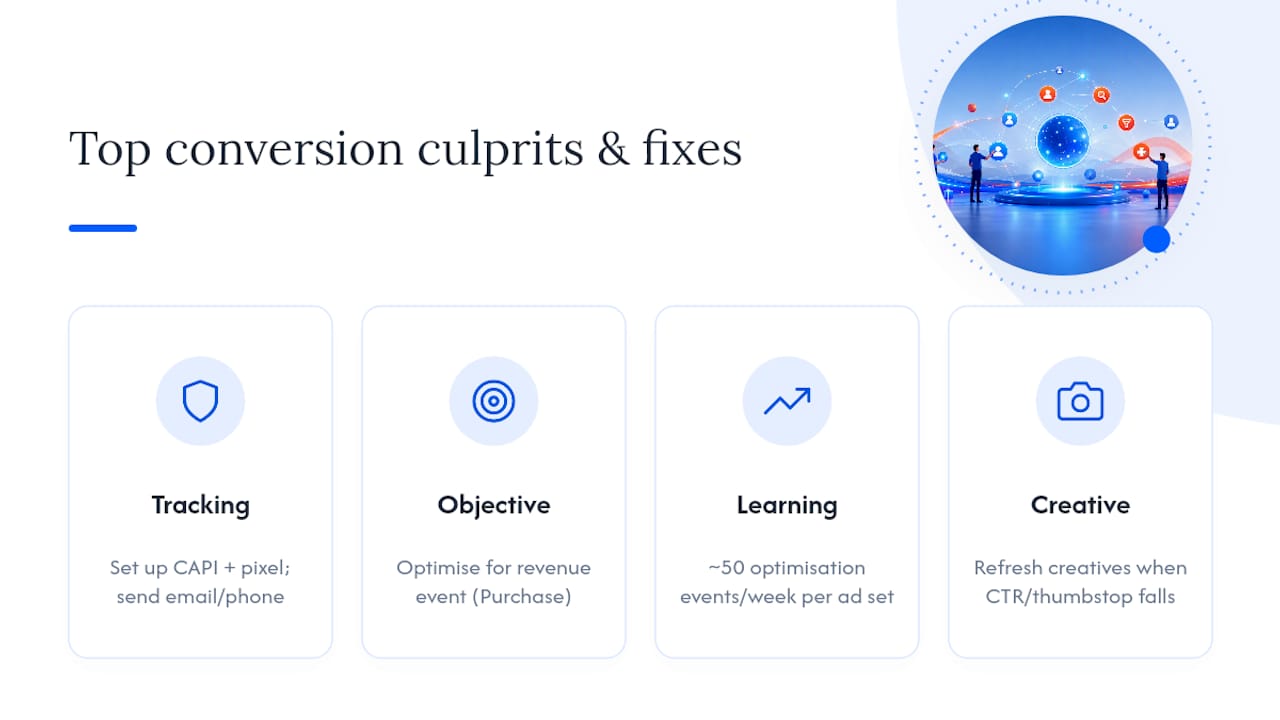
1. Tracking is incomplete or optimising toward the wrong event.
This is the single biggest reason Facebook ads look like they’re not converting when they actually are, just invisibly. Since Apple’s privacy changes reshaped how browsers report activity, the standard browser pixel alone misses a real share of conversions. Sending server-side events through the Conversions API (CAPI) and aiming for an Event Match Quality score of 6 or higher materially improves how well Meta can optimise your campaign. If you’re still relying on browser-only tracking in 2026, you’re optimising with one eye closed.
The fix: set up CAPI alongside your pixel, send matching parameters (email, phone, external ID where available), and use a consistent event_id so Meta deduplicates the browser and server events instead of double-counting them.
2. Your campaign objective doesn’t match the event that actually makes you money.
Optimising for “Landing Page Views” when what you care about is Purchases sends Meta chasing the wrong signal entirely. The algorithm does exactly what you tell it to, so if you tell it to find cheap link clicks, that’s what it’ll find, and none of them will buy anything. Pick the optimisation event that equals revenue, even if it means fewer reported “results” per dollar in the short term.
3. The ad set is stuck in learning, or “Learning Limited,” because of low events or split budgets.
Meta’s delivery system needs a certain volume of optimisation events to work out who to show your ad to. The commonly cited benchmark is roughly 50 optimisation events per week per ad set to exit learning and stabilise. Split $50 a day across five ad sets, and none of them will ever hit that threshold. This is one of the most common and most fixable mistakes small business advertisers make: too many tiny ad sets, each starved of signal.
The fix is almost always consolidation. Fewer ad sets, more budget in each, and a broader audience so Meta has room to find converters. If your cost per result is high, do the maths backwards: work out the daily spend needed to reach 50 events a week at your current cost per event, then either fund that ad set properly or choose an earlier, cheaper optimisation event (like “Add to Cart” instead of “Purchase”) while your account builds volume.
4. Creative fatigue or a weak hook is killing your click-through rate.
If the same three creatives have been running for six weeks, your audience has seen them enough times to tune them out. Check your link CTR and thumbstop rate (how many people stop scrolling to watch) against your account benchmarks. A steady decline over time, with no other changes, is the signature of creative fatigue.
5. Audience overlap or targeting that’s too narrow is starving the algorithm.
Multiple ad sets bidding against each other for the same tiny slice of people pushes your costs up and confuses delivery. Broader, cleaner audiences generally outperform narrow ones now, because the algorithm has more room to find the actual buyers.
6. Post-click friction: message mismatch, slow pages, long forms.
That’s not an ads problem. It’s a landing page problem wearing an ads costume. Covered in detail below.
7. The offer’s economics don’t work at your current cost per acquisition.
Sometimes the ad is doing its job and the maths still doesn’t. If your cost per purchase is higher than your margin can absorb, no amount of “optimisation” fixes that. You either need a better offer, a higher price point, or a lower cost per result, and chasing creative tweaks won’t solve a pricing problem.
8. Attribution and reporting don’t match, so you think it’s broken when it isn’t.
Platform-reported ROAS and your actual revenue often diverge, sometimes by a lot. Compare Meta’s reported return against your total marketing efficiency ratio (total revenue divided by total ad spend) before you panic and pause a campaign that’s quietly working.
9. There’s no follow-up automation on leads, so warm interest goes cold.
For lead generation campaigns specifically, speed matters enormously. Leads contacted within five minutes convert at dramatically higher rates than leads contacted after even thirty minutes. If your sales team checks the lead inbox once a day, you’re losing conversions that never had anything to do with the ad itself.
10. The account has a policy flag or an ad rejection sitting quietly in the Delivery column.
Sometimes it really is that simple. A payment method issue, a rejected ad, or a policy review can stop delivery cold, and the fix takes five minutes once you spot it.
Pro Tip: Fix these in funnel order, not creative-first. Delivery and tracking issues distort every downstream metric, so a “bad” creative test run on top of a broken pixel will lie to you. Diagnose top to bottom before you touch a single headline.
Tracking is where most “my Facebook ads stopped converting” panic actually lives, and it’s also the fastest thing to check properly.
Start with Test Events in Events Manager. Trigger a real purchase (or your key conversion event) on your own site and watch Events Manager in real time. A healthy setup shows the Purchase event appearing within about 60 seconds, with the correct value and currency attached. If nothing appears, or it appears with missing parameters, you’ve found your problem.
CAPI essentials worth checking:
Event Match Quality (EMQ) is Meta’s own score of how well your sent events match real user profiles, on a scale where you’re aiming for 6 or higher. You’ll find this score in Events Manager next to each event. If yours sits below that, the fix is usually adding more match parameters, not rebuilding the whole integration.
Once you fix tracking, don’t expect instant results. Give the system 48 to 72 hours for tracked Purchase volume to properly reappear, and understand that a major tracking fix often resets or restarts the learning phase, because Meta is now working with a different, more accurate signal than before.
In 2026, most accounts start with Advantage+ audiences or genuinely broad targeting as the default, not the exception. That’s a deliberate shift: the algorithm, given clean first-party signal, generally finds converting pockets on its own far more efficiently than manual audience-stacking ever did. That means creative quality and variety have become the main dial you’re turning, not audience segments.
Diagnose your creative the same way you’d diagnose anything else, with numbers, not gut feel:
Aim to keep 8 to 15 fresh creative assets rotating through your active ad sets each month where your budget allows it. That’s not a number to hit for its own sake. It’s roughly what it takes to stay ahead of fatigue without diluting signal across too many variants at once.
One thing that trips up a lot of business owners: not every creative change resets learning. Swapping a headline or adding a new image to an existing ad usually doesn’t restart the clock. Changing the optimisation event, the audience, or the bid strategy generally does. Know the difference before you go “refreshing” a campaign that was actually working.
Pro Tip: If a creative is genuinely tired, duplicate the ad set with the new creative rather than editing the winning one directly. You keep the working version live while you test the replacement, instead of gambling the whole ad set on an untested asset.
A click that doesn’t convert is often a landing page problem, not an ads problem. This is the lane most business owners skip because the ad itself feels like the thing to fix, when the leak is one step further down the funnel.
Start with landing page view rate (LPV): divide landing page views by link clicks. A healthy setup keeps this above roughly 70%. Below that, something is actively pushing people away before the page even finishes loading, which usually means slow load time, a mismatched offer, or both.
Run this message match checklist against your own landing page right now:
Form design matters more than most business owners assume. Keep your initial form to 3 to 5 fields. Every extra field you add drops completion rates, and it compounds fast on mobile, where most Facebook traffic now lands. Push non-essential questions to a follow-up step after the initial submission, once someone’s already committed.
Speed is non-negotiable and takes minutes to check: load your own landing page on your phone, on mobile data, not office wifi. If it drags, so does your conversion rate. Good website copywriting also plays a direct role here, because message match isn’t just design, it’s language matching what the ad already promised. If your landing page consistently underperforms regardless of which ad drives traffic to it, the problem usually sits in the page itself, not in Meta’s targeting.

Budget structure decides whether Meta’s algorithm ever gets enough signal to do its job properly. Fragmented budgets across a dozen tiny ad sets is one of the most common self-inflicted wounds in accounts that feel like they’re “not converting” when they’re really just underfed.
Scale gradually and validate as you go. A campaign that looks profitable on platform-reported ROAS but doesn’t move your actual bank balance needs a second look at the economics, not a bigger budget. If you’re running paid search alongside Meta, the same diagnostic logic applies to Google Ads that aren’t converting, since attribution mismatches show up across every platform, not just one.
Run this top to bottom. Don’t skip ahead to creative until the earlier steps check out.
Pro Tip: Write today’s date next to each fix as you make it. When you’re comparing “before and after” numbers a week later, you need to know exactly which fix caused which change, not a blur of edits made across three days.
If, after running all seven steps, performance still hasn’t lifted, the issue usually isn’t technical anymore. It’s strategic: the offer, the audience fit, or the broader marketing system around the ad.
Sometimes the checklist above finds nothing badly broken, and the ads still aren’t converting the way they should. That usually means the gap isn’t technical at all. It’s the offer, the messaging, or the system sitting behind the ad account.
There are structured, expert-led workshops available for service business owners dealing with ads that technically work but don’t build a real customer base. Rather than another DIY checklist, the program pairs personal mentorship with practical templates across a three-phase structure, so you fix your business direction and your website foundations before you pour more money into traffic. If your landing pages are the weak link, the copywriting workshop walks through message match and offer clarity in detail. If leads are arriving but going cold, the lead generation sales flow and nurture workshop builds the follow-up system that speed-to-lead depends on.
Participants get accountability and community support, which helps the fixes stick instead of drifting back to old habits within a month. Browse the full workshop catalogue to see which one maps to where your funnel is actually leaking, or start with the overview of available workshops if you’re not yet sure which gap to close first.
This almost always points to either broken tracking (Meta can’t see the sale that actually happened) or post-click friction on your landing page. Check your landing page view rate first; below roughly 70% signals a page problem, not an audience problem.
Yes, but the mechanics have shifted toward broad Advantage+ targeting, clean first-party tracking through CAPI, and creative quality as the main performance lever, rather than manual audience-stacking.
A sudden drop usually traces to a tracking break (a site update that stopped firing the pixel), an ad rejection sitting in the Delivery column, or creative fatigue setting in after weeks of the same assets running. Check Delivery and Test Events before assuming demand has dried up.
Genuine platform-wide outages are rare and usually confirmed quickly across advertiser forums. Far more often, the fault sits in one of the four lanes covered above: delivery, tracking, conversion, or economics, specific to your own account setup.