

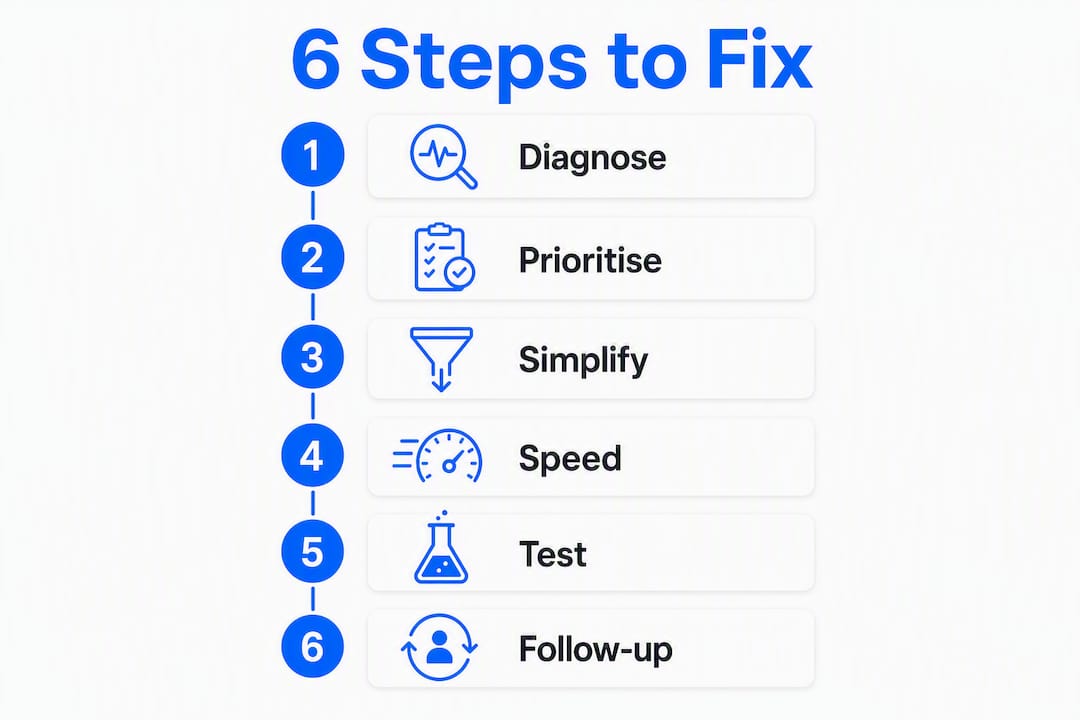
Follow these six steps to diagnose and fix a low-converting website and start turning visitors into leads this month. The order matters: most businesses waste money on redesigns before they understand what is actually broken.
The six steps at a glance:
Pro Tip: Before you redesign a single page, spend one week in your analytics. Most conversion problems are a messaging or traffic issue, not a design issue. Redesigning without data is just expensive guessing.
Low conversion is rarely what it looks like on the surface. Australian service businesses typically see conversion rates in the low single digits, and the gap between average and top-performing sites usually comes down to traffic quality and funnel clarity, not aesthetics.
Before blaming your design, check these first:
Session recordings and heatmaps add a layer analytics cannot. They show you where visitors hesitate, what they click that is not a link, and how far they scroll. Run recordings on your highest-traffic landing page for two weeks before drawing conclusions.
Pro Tip: If your traffic sources are misaligned with your offer, no amount of page-level tweaking will fix your numbers. Confirm traffic quality first.

Not every fix deserves equal attention. A simple ICE scoring framework (Impact, Confidence, Ease) helps small teams decide without debate. Score each potential fix from 1–10 on each factor, add the scores, and tackle the highest totals first.
| Conversion leak | Typical impact | Ease of fix | Suggested first action |
|---|---|---|---|
| Unclear hero headline | High | Easy | Rewrite to: service + who it’s for + outcome |
| Hidden or weak CTA | High | Easy | Make primary CTA visible above the fold |
| Long contact form | High | Easy | Reduce to 3–4 fields for first contact |
| Slow mobile page speed | High | Medium | Compress images, enable caching |
| Missing trust signals | Medium | Easy | Add reviews and real photos near CTA |
| Thin service pages | Medium | Medium | Expand with outcomes, FAQs, proof |
| Poor traffic alignment | High | Medium | Audit ad targeting and keyword intent |
Quick wins — headline rewrites, CTA copy, shorter forms — often show measurable results within weeks. Larger bets like platform rebuilds or backend speed work take months to validate, so prioritise the quick wins first and use the early data to justify bigger investments.
Pro Tip: Validate your traffic quality before spending on any technical rebuild. If 40% of your visitors are outside your service area, fixing page speed will not move your lead numbers.
The hero section is where most service websites lose visitors. Visitors decide within seconds whether a page is relevant, so your headline needs to answer three things immediately: what you do, who it is for, and what outcome they can expect.
Before: “Welcome to our website. We offer professional services.”
After: “HR consulting for Sydney small businesses — get compliant and confident in 90 days.”
CTA rules that actually work:
For forms, shorter is better. A first-contact form needs a name, email, and one qualifying question at most. Use inline validation so errors appear as people type, not after they hit submit.
Trust signals belong near your CTAs, not buried in a footer. Real team photos, named client testimonials, recognisable client logos, and any relevant licences or guarantees all reduce the anxiety a visitor feels before committing. These are decision-making elements, not decorations.
On paid landing pages, remove the main navigation and any external links. Every click away from the page is a conversion you will not get back.
Pro Tip: Speed of follow-up matters as much as the on-page experience. A lead who fills in your form and hears nothing for 24 hours is likely already talking to someone else. Set up an immediate auto-reply that confirms receipt and sets expectations.
Slow pages and poor mobile experience are among the most common and most fixable conversion killers for service businesses. Mobile traffic now dominates most small business websites, and a page that loads slowly or displays poorly on a phone will lose visitors before they read a single word.

Run Google PageSpeed Insights on your homepage and your top landing page. Look at both mobile and desktop scores. Core Web Vitals — Largest Contentful Paint, Cumulative Layout Shift, and Interaction to Next Paint — tell you specifically where the experience breaks down.
| Technical fix | Effort | Conversion benefit |
|---|---|---|
| Compress and convert images to WebP/AVIF | Low | High |
| Remove unused plugins and scripts | Low | Medium–High |
| Enable browser caching and a CDN | Low–Medium | High |
| Defer non-critical JavaScript | Medium | Medium |
| Lazy-load offscreen images | Low | Medium |
| Upgrade to faster hosting | Medium | High |
Mobile UX checks to run right now:
Most of these fixes can be handled through your CMS settings or a caching plugin without developer time. If your hosting is shared and consistently slow, upgrading to managed hosting is often the single highest-impact technical change you can make.
Pro Tip: Test your site on a real mid-range Android device on a 4G connection, not just on your own laptop. That is closer to the experience most of your visitors are having.
Conversion rate optimisation is a cycle, not a project. The five steps are: diagnose, hypothesise, prioritise, test, and analyse. Running them in sequence, repeatedly, is what compounds results over time.
Core metrics to track:
For each problem you find, write a specific hypothesis: “Because visitors are not scrolling past the hero section, we believe moving the primary CTA above the fold will increase enquiry form completions, because the CTA is currently invisible on first load.”
Running a test:
For pages with fewer than 1,000 monthly visitors, a formal A/B test will not reach reliable conclusions in a reasonable timeframe. Use a before/after comparison over a matched period instead, and treat the result as directional evidence rather than proof.
Pro Tip: Keep a simple spreadsheet of every test you run: the hypothesis, the change, the dates, and the result. Without it, you will repeat tests you have already run and lose the compounding benefit of each learning.
A realistic timeline stops the list of fixes from sitting in a document forever. Here is a practical structure for a small business owner or a small marketing team.
Days 1–30: Diagnose and quick wins
Owner-led tasks. No developer needed for most of these.
Days 31–60: Technical fixes and trust signals
Mix of owner and developer tasks. Budget 4–8 hours of developer time if needed.
Days 61–90: Review, refine and plan next cycle
Owner-led with input from whoever manages your site.
Yes, and you do not need expensive software to start. The simplest form of personalisation is creating separate landing pages for different traffic sources or audience types. A visitor arriving from a Google ad for “accountant for tradies” should land on a page written specifically for tradies, not your generic homepage.
Beyond separate pages, consider:
Even basic segmentation, matching your message to the intent behind the visit, consistently outperforms a single generic homepage for all traffic.
A content audit is one of the most overlooked steps in improving website conversion. The question is simple: does each page on your site answer the question the visitor arrived with?
Start with your top five landing pages in GA4. For each one, check:
Thin service pages, pages that describe what you do without explaining outcomes or addressing objections, are one of the most common conversion killers for service businesses. Adding a short FAQ section to each service page, covering the questions buyers actually ask, often lifts both search rankings and conversion rates at the same time.
Visitors rarely convert on logic alone. Several well-established principles influence whether someone takes the next step, and they are worth building into your pages deliberately.
Scarcity and urgency work when they are genuine. A limited intake of clients per month, a real deadline for a seasonal offer, or a note that your next available appointment is three weeks away all create legitimate urgency. Manufactured countdown timers with no real deadline erode trust.
Reciprocity is the principle that giving something valuable first makes people more likely to give back. A free checklist, a short audit, or a genuinely useful guide offered before asking for contact details shifts the dynamic from “sell me something” to “help me first.”
Social proof reduces perceived risk. Named testimonials with a photo and a specific outcome (“We went from three enquiries a month to twelve after working with them”) are far more persuasive than anonymous five-star ratings. Place proof closest to the point where visitors are most likely to hesitate, which is usually right above or below your primary CTA.
Authority signals such as years in business, number of clients served, media mentions, or industry memberships tell a visitor they are dealing with someone credible. These belong in the hero section or near the CTA, not buried on an About page.
Not every visitor is ready to enquire on their first visit. Email capture lets you stay in contact with the people who were interested but not yet ready, and a well-structured nurture sequence brings many of them back.
The key is to offer something worth exchanging an email address for. A generic “sign up for our newsletter” converts poorly. A specific lead magnet tied to the visitor’s problem, such as a checklist, a short guide, or a free mini-audit, converts much better.
Once you have an email address, a simple three-to-five email sequence does most of the work:
The sequence does not need to be long or complex. Its job is to keep you visible and credible until the prospect is ready to act. Pair this with the speed-to-lead principle from earlier: anyone who fills in a contact form should receive an immediate, personal-feeling response, even if it is automated.
Fixing a low-converting website comes down to diagnosing the real problem first, then applying high-impact fixes in a structured order before investing in redesigns or major technical work.
| Point | Details |
|---|---|
| Diagnose before you change anything | Check traffic quality, funnel drop-off, and bounce rates in GA4 before touching design. |
| Quick wins come first | Headline clarity, CTA visibility, and shorter forms often lift conversions within weeks. |
| Speed and mobile are non-negotiable | Slow mobile pages lose visitors before they read your offer; fix images and caching first. |
| Test one change at a time | Single-change comparisons over two-week windows give reliable signals on low-traffic pages. |
| Mybworkshops framework | Mybworkshops workshops cover the full CRO cycle, from analytics setup to messaging and testing, with templates and guided implementation. |
Knowing the six steps is one thing. Having the templates, frameworks, and expert guidance to implement them without wasting months on trial and error is another. Mybworkshops is built specifically for service-based business owners who want to improve their website conversion without hiring an agency or spending months figuring it out alone.
The workshops cover the full process: setting up your analytics correctly, writing hero headlines that convert, building trust signals that work for service businesses, and running a repeatable CRO cycle that compounds over time. You get practical templates, AI prompts, and a community of business owners working through the same challenges. The website conversion workshops are structured around the same diagnose-prioritise-test-measure cycle this guide walks you through, so you can move from reading to doing in a single session. If you want to see what other service businesses have built using this framework, the client outcomes page shows real results. Browse the available workshops and pick the one that matches where you are right now.
These are the most useful resources referenced in this guide, along with what to do with each one.
The most common causes are poor traffic alignment, an unclear hero message, a weak or hidden CTA, and slow mobile load times. Audit your funnel in GA4 to find the specific drop-off point before making changes.
Australian service businesses typically see conversion rates in the low single digits. Top-performing sites focus on high-intent traffic and clear funnel paths rather than chasing volume.
Start with three high-impact, low-effort fixes: rewrite your hero headline to include service, audience, and outcome; reduce your contact form to 3–4 fields; and make your primary CTA visible above the fold on mobile. These changes often deliver measurable results within weeks.
Diagnose where visitors drop off using analytics and heatmaps, form a specific hypothesis about why, prioritise fixes using an ICE score, then test one change at a time and analyse the result before repeating the cycle.