

A slow website does not just frustrate visitors — it costs you real money. Google field data shows that 53% of mobile visitors abandon a site that takes longer than 3 seconds to load, and a Deloitte and Google analysis found that small improvements in mobile speed increased retail conversions substantially. Those are not abstract statistics. They translate directly into enquiries you never receive, sales that go to a competitor, and ad spend that produces nothing.
The core reason why slow websites lose customers comes down to three things: higher bounce rates, eroded trust, and a broken conversion funnel. Each extra second of load time compounds all three.
The immediate action: open Google PageSpeed Insights right now, run your homepage on mobile, and identify the single largest Largest Contentful Paint (LCP) element. That one fix, usually a heavy hero image, typically delivers the biggest speed gain for the least effort.
Key revenue impacts at a glance:
Pro Tip: Run your mobile test on PageSpeed Insights before reading further. Note your LCP score. By the end of this article, you will know exactly what to do with it.
Every extra second your site takes to load increases the probability that a visitor leaves before they see your offer. Research published by Retail Dive found that consumers often permanently lose trust in a brand after only a small number of poor website interactions, which means a slow site is not just a one-visit problem — it is a long-term retention risk.
The psychological mechanism is straightforward. When a page loads slowly, visitors interpret it as a signal that the business is unreliable or unprofessional. That judgement happens in under three seconds, before they have read a single word of your copy. Cognitive load increases as users wait, their decision-making confidence drops, and they click away. On mobile, where most commercial searches now happen, this effect is sharper because users are often on the move with less patience for friction.
Stat: 53% of mobile visitors abandon a site that takes more than 3 seconds to load (Google field data, via Studio Slate).
For ecommerce businesses, the damage concentrates at two specific points: product pages and checkout. A visitor who has already added items to a cart and then hits a slow checkout page is at peak purchase intent. A delay there does not just lose a sale — it loses a customer who was ready to buy. Lead-generation businesses face a parallel problem: a slow contact page or landing page breaks the momentum that your ad or organic content created.
Speed also affects repeat behaviour. A visitor who had a slow experience on your site is less likely to return, less likely to refer others, and more likely to leave a negative review. The impact of website speed on customer retention compounds over time in ways that a single conversion metric will not capture.
The most common causes of a slow site are predictable, and most of them are fixable without a full rebuild.
The usual culprits:
Pro Tip: Before briefing a developer, run your URL through Google PageSpeed Insights and screenshot the “Opportunities” section. That list is your brief — it tells a developer exactly what to fix, in priority order.
A non-technical diagnostic checklist you can use right now:
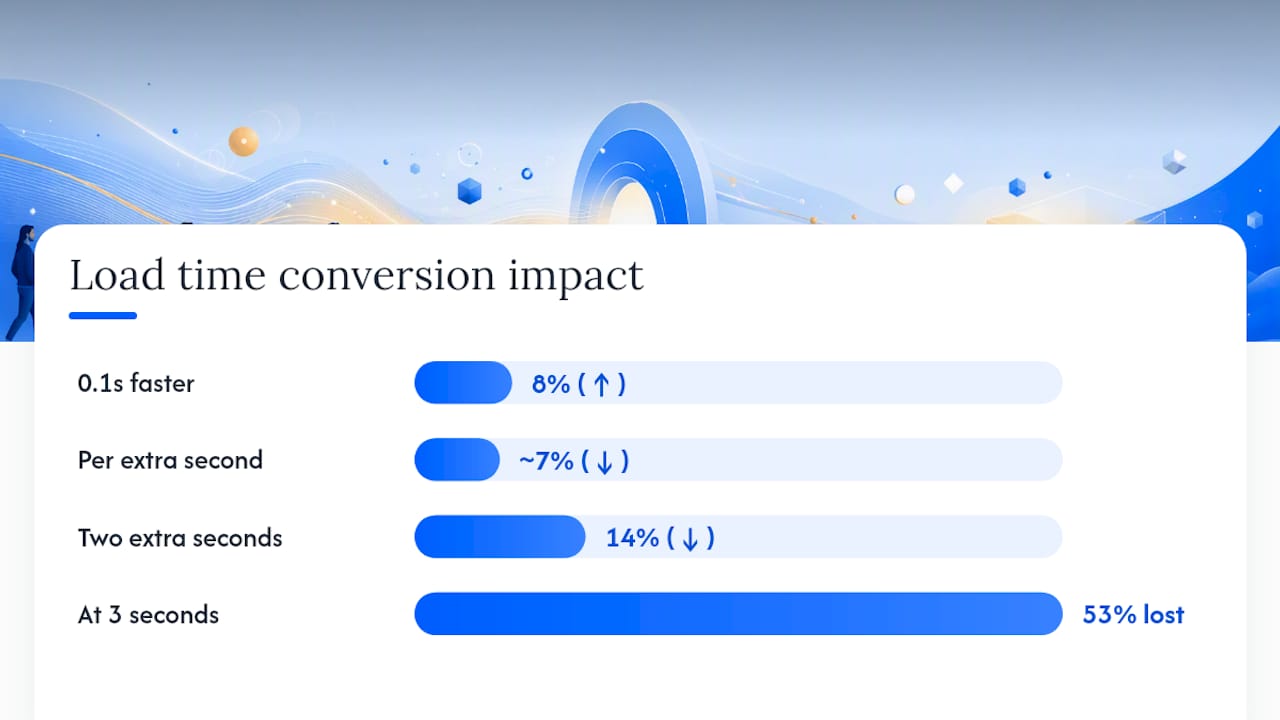
Each second of delay has a predictable conversion cost. The Deloitte and Google analysis found that a 0.1-second improvement in mobile speed increased retail conversions by approximately 8%. A commonly cited industry benchmark puts the conversion drop at around 7% per additional second of load time. At 3 seconds, you have already lost 53% of your mobile audience.
Worked example for a small Australian service business:
Assume your website receives 1,000 visitors per month, converts at 3%, and each conversion is worth $500 in revenue. That is $15,000 per month. If your site loads in 4 seconds instead of 2 seconds, and that extra delay reduces conversions by roughly 14% (two additional seconds at ~7% each), you are losing approximately $2,100 per month — or $25,200 per year. That figure does not include the compounding effect on trust, repeat visits, or word-of-mouth.
Speed problems also raise your cost of customer acquisition by degrading landing page experience scores in Google Ads, which inflates CPCs and wastes ad spend. For businesses running paid traffic, a slow site is an invisible tax on every dollar spent.
| Fix type | Effort | Estimated conversion impact | Approximate cost and time |
|---|---|---|---|
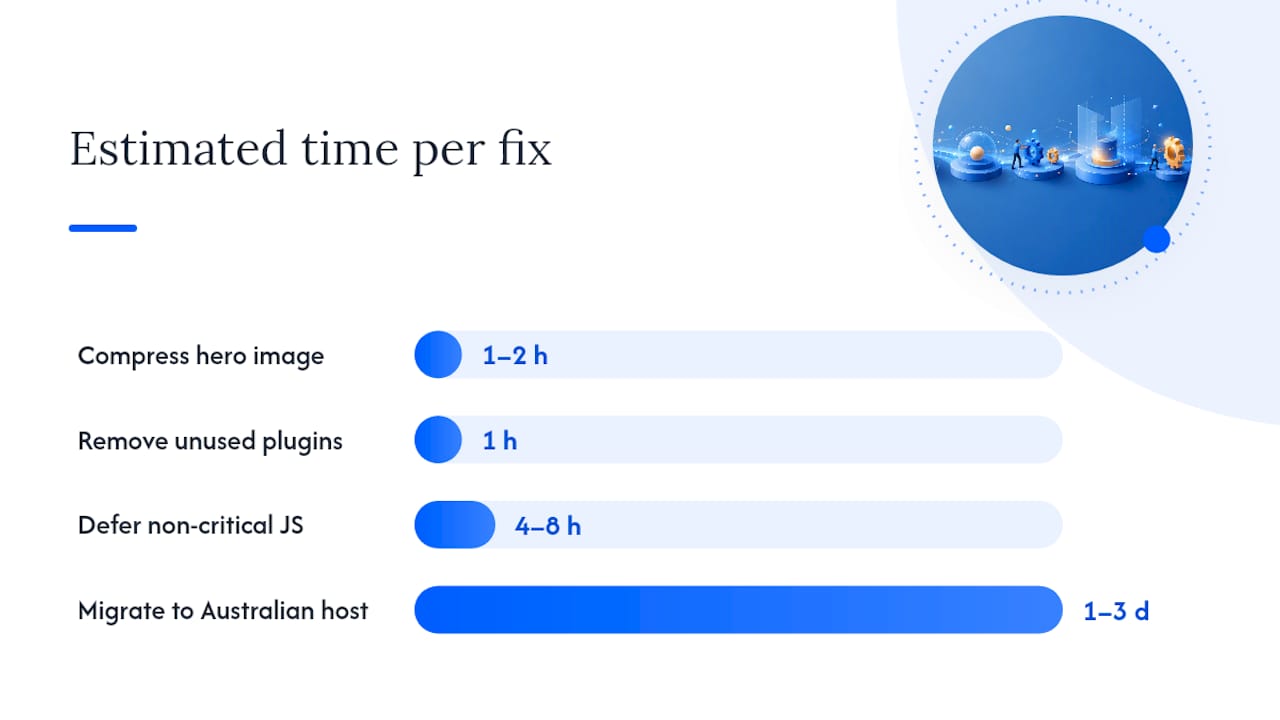
| Compress and resize hero image | Low | High — often largest LCP gain | $0–$200, 1–2 hours |
| Enable server/browser caching | Low | Medium — reduces repeat load times | — |
| Defer render-blocking JS | Medium | Medium to high | $200–$500, 4–8 hours |
| Remove unused plugins | Low | Medium | $0, 1 hour |
| Migrate to Australian hosting | Medium | High for TTFB and local visitors | $20/month, 1–3 days |
| Implement a CDN | Medium | High for global and mobile visitors | $0–$50/month, 1–2 days |
Start with the LCP element. On most small business sites, this is the hero image on the homepage or a key landing page. Compressing it, converting it to WebP format, and serving it at the correct display size is the single highest-impact, lowest-effort change you can make.
Priority fix table:
| Priority | Fix | Impact vs effort | Est. conversion/revenue impact | Approx. cost and time |
|---|---|---|---|---|
| High | Compress and serve responsive hero image | High impact, low effort | Largest single LCP gain | $0–$200, 1–2 hours |
| High | Enable caching (server + browser) | High impact, low effort | Faster repeat visits, lower bounce | — |
| High | Remove unused plugins and scripts | High impact, low effort | Reduces render-blocking resources | $0, 1 hour |
| Medium | Defer or async non-critical JavaScript | Medium impact, medium effort | Improves INP and TBT | $200–$500, 4–8 hours |
| Medium | Migrate to Australian hosting or add CDN | High impact, medium effort | Reduces TTFB for local visitors | $20–$150/month, 1–3 days |
| Low | Subset and self-host web fonts | Low impact, low effort | Minor FCP improvement | — |
Step-by-step checklist for owners or developers:
defer or async attributes, or ask your developer to do so.After each change, re-run PageSpeed Insights and WebPageTest to confirm the improvement. Look for a drop in LCP time and an increase in the overall Performance score. A website that converts depends on both speed and content working together — speed gets visitors to stay; content gets them to act.
Australian routing and peak-period behaviour can add baseline latency that changes which fixes matter most for your visitors. The ACCC’s broadband performance data documents busy-hour behaviour on Australian fixed-line connections, showing that speeds and latency worsen during evening peak periods — typically 7 PM to 11 PM — when many consumers browse and shop online.
For businesses with a US or European host, every visitor request travels internationally before the server responds. That round trip adds 150–300ms to TTFB before the browser has received a single byte of your page. On a fast connection this is noticeable; on a congested NBN connection during peak hours, it compounds significantly.
Stat: Hosting in a US or EU data centre can add 150–300ms of round-trip latency for Australian visitors, and migrating to an Australian-based host often reduces TTFB substantially.
Practical implications for Australian businesses:
Follow three steps: measure, apply quick wins, then tackle technical upgrades. Re-test after each stage.
Next 7 days:
Next 30 days:
Next 90 days:
Quick wins — image compression, caching, and plugin removal — can show measurable conversion changes within days. Hosting migration and JavaScript deferral typically take two to four weeks to plan and execute. The full compound benefit of all fixes together usually becomes visible in your analytics within 60–90 days.
A slow website costs you customers and revenue at every stage of the funnel — from first impression to checkout — and the fixes that return the most value are usually the simplest ones.
| Point | Details |
|---|---|
| Speed costs real revenue | A 0.1-second mobile improvement can lift retail conversions by ~8%; at 3 seconds, 53% of mobile visitors have already left. |
| Measure lab and field data | Use PageSpeed Insights for lab scores and Chrome field data together; neither alone gives the full picture. |
| Fix LCP and checkout first | The hero image and checkout page deliver the highest return on speed investment for most small businesses. |
| Australian hosting matters | US or EU servers add 150–300ms of latency for local visitors; Australian hosting or a CDN with local edge nodes reduces TTFB. |
| Mybworkshops workshops | Mybworkshops helps service-based business owners diagnose speed-related conversion loss and build a website that converts as part of a broader marketing system. |
Speed is only one part of a website that consistently wins customers. Once your pages load quickly, the next question is whether your copy, layout, and calls-to-action are doing their job. That is where many business owners stall — they fix the technical issues but still see flat enquiry rates because the conversion fundamentals are not in place.

Mybworkshops offers expert-led online workshops built specifically for service-based business owners who want a website that attracts leads and converts them into paying clients. The website conversion workshop walks you through a practical checklist, covers the most common website conversion killers, and gives you templates and AI prompts you can apply immediately. There is no long-term retainer and no agency markup — you learn the system, you own the result.
If your site is slow and your enquiry rate is flat, the Mybworkshops workshop archive is the practical next step. Browse the available workshops, pick the one that matches your current gap, and start fixing what is costing you customers.
Testing tools:
Research and benchmarks:
Run your homepage through Google PageSpeed Insights on mobile. An LCP score above 2.5 seconds or a Performance score below 50 indicates your site is likely losing visitors before they engage.
Most small business sites are built on shared hosting with overseas servers, use image-heavy themes, and accumulate plugins over time. Each of these adds load time, and they are rarely audited after the initial build.
Product pages carry large images, inventory scripts, review widgets, and payment provider scripts simultaneously. Each element adds a network request, and without deliberate optimisation, the combined weight slows the page significantly.
Compress all images above 200KB using a free tool like Squoosh, enable caching through your hosting control panel, and add Cloudflare’s free CDN tier. These three steps require no coding and typically produce the largest speed gains.
Yes. Google uses landing page experience as part of its Quality Score calculation. A slow landing page earns a lower score, which raises your cost-per-click and reduces your ad’s position, meaning you pay more for less visibility.