

Most Google Ads conversion problems trace back to one of three root causes: broken or misconfigured conversion tracking, a landing page that doesn’t match the ad’s promise, or keywords attracting the wrong intent. Before you adjust bids or rewrite ads, check your conversion tag first.
Run these three checks right now:
Fix each of these and you’ll typically see one of three outcomes:
Fixing Google Ads conversion problems starts with verifying your tracking, then your landing page, then your keywords — in that order, every time.
| Point | Details |
|---|---|
| Fix tracking first | Broken or misconfigured conversion tags are the most common cause of apparent non-performance — validate with Google Tag Assistant before changing anything else. |
| Match your headlines | Your ad headline and landing page headline must align closely; mismatch is a leading cause of high bounce rates from paid traffic. |
| Clean your keywords weekly | Add irrelevant search terms as negatives and pause keywords with 100+ clicks and zero conversions to stop wasted spend. |
| Smart Bidding needs real signals | Set primary conversions to form submissions or calls, not micro-events; Smart Bidding optimises toward whatever you count as a conversion. |
| Mybworkshops Ads That Convert | The Ads That Convert workshop gives you a structured, self-implementable framework for tracking, landing pages, and keyword intent. |
Before changing anything, gather evidence. Changing bids or budgets without a diagnosis is like adjusting the thermostat when the heater isn’t plugged in.
Check conversion tag status. In Google Ads, navigate to Goals > Conversions > Summary. Every active conversion action should show “Recording conversions.” If any show “Inactive,” “Tag unverified,” or “No recent conversions,” that’s your first problem. Google’s conversion setup documentation warns specifically about common pitfalls: counting page visits instead of actual conversions, and duplicate tag firings that inflate numbers.
Validate with Google Tag Assistant. Install the Google Tag Assistant browser extension, visit your thank-you or confirmation page, and confirm the Google tag (gtag.js) or Google Tag Manager container fires correctly. A green tick means the tag is active; a red or orange flag means it’s broken or misfiring.
Run a test conversion. Submit your own contact form or complete a purchase on your site. Open GA4 and go to Reports > Realtime. Within 60 seconds you should see an event appear. If nothing shows, your tracking is broken regardless of what Google Ads reports.
Review the Search Terms report. In Google Ads, go to Keywords > Search Terms. Sort by clicks. Look at the first 20–30 terms. Are they what a ready-to-buy customer would type, or are they research queries, competitor names, or irrelevant phrases? Screenshot the worst offenders — these become your negative keyword list.
Check your top-converting keywords. Still in Keywords, sort by conversions. If zero keywords show conversions, either tracking is broken or no keyword has driven a real enquiry yet. If a handful of keywords drive all conversions, note them — they deserve more budget.
Split performance by device. Go to Campaigns > Segment > Device. Compare conversion rates across mobile, desktop, and tablet. A mobile CTR that’s high but a mobile conversion rate that’s near zero points to a landing-page UX problem on phones.
Check your location report. Go to Campaigns > Locations. Are clicks coming from the areas you actually serve? Mismatched locations waste budget fast, especially for local service businesses.
Visit your landing page URL. Open the exact URL your ads send traffic to. Time how long it takes to load on a mobile connection. Read the headline. Is the offer clear within five seconds? Is there a visible call-to-action (CTA) above the fold?
Collect as you go:
This evidence tells you exactly which section below to prioritise.
WordStream’s analysis of non-converting campaigns and practitioner audits from Australian digital marketers consistently point to the same cluster of problems. Here’s each one with a clear fix.
How to check: Conversion status shows “Inactive” or “No recent conversions” in Goals > Conversions. Test conversion doesn’t appear in GA4 Realtime.
Fix: Reinstall the Google tag via Google Tag Manager, set the conversion action to fire on the thank-you page URL (not the form page), and run a test. Avoid counting page visits as conversions — Google’s own documentation flags this as one of the most common setup errors.
Time to results: Immediate once fixed. Priority: Critical — fix before anything else.
How to check: Your ad headline promises “Affordable bookkeeping for tradies” but the landing page headline reads “Welcome to Smith Accounting.” The visitor feels lost and leaves.
Fix: Match the landing page headline to the ad headline exactly. Use the same language, the same offer, and the same tone. Landing-page issues are frequently the primary cause of low conversion rates from paid traffic — fixing message match alone can lift conversion rates noticeably.
Time to results: Days. Priority: High.
How to check: Search Terms report shows queries like “how does bookkeeping work” or “bookkeeping software free” driving clicks.
Fix: Add those terms as negative keywords immediately. Shift broad match keywords to phrase or exact match until you have enough conversion data to trust Smart Bidding. Use Optmyzr’s keyword diagnostic approach — segment by intent, not just volume.
Time to results: Days to one week. Priority: High.
How to check: High CTR but low conversion rate. Ads attract clicks from people who aren’t ready to pay your prices.
Fix: Including price information in your ads pre-qualifies searchers and filters out users who aren’t prepared to pay your rate. Add a price range, a starting-from figure, or a clear qualifier (“For businesses turning over $500K+”).
Time to results: One to two weeks. Priority: Medium-high.
Pro Tip: Adding “From $X” or “Packages from $X/month” to your headline is one of the fastest ways to improve conversion quality without touching your bids. Fewer clicks, better leads.
How to check: Location report shows clicks from suburbs or states you don’t serve. Audience segments include broad interest categories unrelated to your service.
Fix: Tighten location targeting to your actual service area. For local businesses, use “Presence” targeting (not “Presence or interest”) so ads only show to people physically in your area.
Time to results: Immediate. Priority: Quick win.
How to check: Run your landing page URL through Google PageSpeed Insights. A mobile score below 50 or a load time above 3 seconds on mobile is a conversion killer.
Fix: Compress images, remove unnecessary scripts, and consider a faster hosting plan. Every second of load time above 3 seconds on mobile increases the likelihood a visitor leaves before the page finishes loading.
Time to results: Days once fixed. Priority: Medium.
How to check: The page has no reviews, no credentials, no photos of real people, and no clear reason to choose you over a competitor.
Fix: Add Google reviews, a professional photo, a clear guarantee or refund policy, and one or two client results. Trust signals matter more for paid traffic than organic, because paid visitors haven’t searched your brand name — they don’t know you yet.
Time to results: One to two weeks. Priority: Medium.
How to check: Your primary conversion action is something like “page view” or “scroll depth” rather than a form submission or phone call.
Fix: Smart Bidding requires accurate, primary conversion signals — form confirmations and qualified calls — to work correctly. Micro-conversions (scroll events, video plays) should be set as secondary conversions only, so they inform reporting without influencing bidding.
Time to results: Two to four weeks for Smart Bidding to re-learn. Priority: High.
How to check: Your conversion count seems unusually high relative to your actual enquiries. In Google Tag Assistant, the conversion tag fires multiple times on a single page load.
Fix: Audit your Google Tag Manager container for duplicate tags. Remove any hardcoded gtag.js snippets from your site’s theme if you’re also using GTM. One tag, one trigger, one conversion action per outcome.
Time to results: Immediate. Priority: Critical if present.
Mobile bounce rate is high.
Fix: Test your entire conversion flow on a real phone — not just the landing page, but the form, the thank-you page, and any click-to-call buttons. Buttons should be large enough to tap, forms should have minimal fields, and the CTA should be visible without scrolling.
Time to results: Days once fixed. Priority: Medium-high.
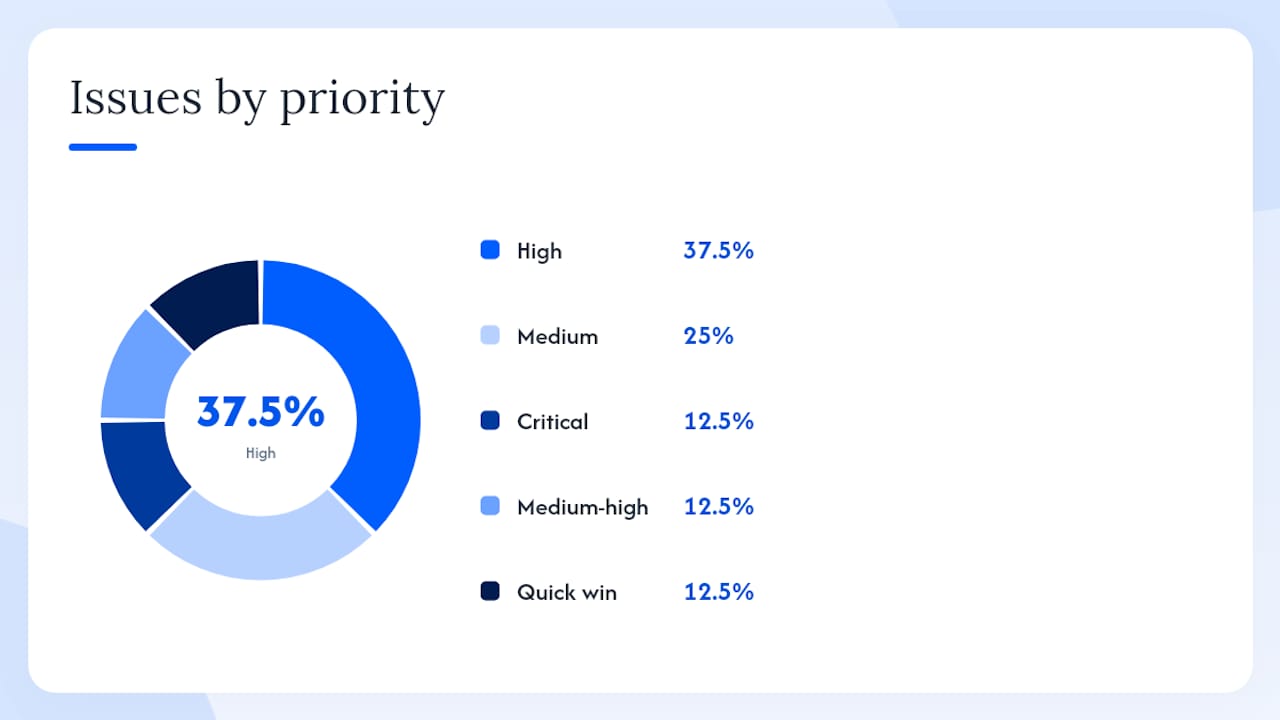
Summary: diagnosed problem → fix → priority
| Diagnosed problem | Evidence to look for | Fix | Time to results | Priority |
|---|---|---|---|---|
| Broken conversion tracking | “Inactive” tag status; no GA4 Realtime event | Reinstall tag via GTM; test conversion | Immediate | Critical |
| Landing-page mismatch | Ad headline ≠ page headline; high bounce rate | Match headlines; align offer and CTA | Days | High |
| Low-intent keywords | Irrelevant search terms; low conversion rate | Add negatives; tighten match types | Days–1 week | High |
| Missing price signalling | High CTR, low conversion quality | Add price range to ad headline | 1–2 weeks | Medium-high |
| Location mismatch | Clicks from outside service area | Set “Presence” targeting; refine radius | Immediate | Quick win |
| Slow page speed | PageSpeed score below 50 mobile | Compress images; upgrade hosting | Days | Medium |
| Weak trust signals | No reviews, no credentials on page | Add reviews, photo, guarantee | 1–2 weeks | Medium |
| Wrong Smart Bidding goal | Micro-conversions as primary | Set primary = form/call; secondary = micro | 2–4 weeks | High |
| Duplicate tags | Conversion count inflated vs. actual enquiries | Audit GTM; remove duplicate tags | Immediate | Critical |
| Device UX problems | Mobile CR much lower than desktop | Fix mobile form, CTA, button sizes | Days | Medium-high |
Your ad can be perfect and still fail if the page it sends people to isn’t built for conversion. UX and message match are critical for converting paid traffic, especially on mobile. Here’s a fast audit you can run in five minutes.
Run your landing page URL through Google PageSpeed Insights. Aim for a mobile load time under 3 seconds. A score below 50 on mobile typically means images aren’t compressed, render-blocking scripts are present, or the hosting is too slow for Australian visitors. Fix the largest images first — they usually account for most of the load time.
Check your common website conversion killers too: broken forms, missing confirmation pages, and auto-playing video all suppress conversions silently.
Add at least one of these to every paid landing page: a Google review snippet, a recognisable credential or association logo, a photo of you or your team, or a short client result. Then test one element at a time. A simple A/B test might compare two headlines or two CTA button colours — run it for at least two weeks before drawing conclusions.
Sample metric thresholds for paid traffic landing pages
These ranges are conservative benchmarks for Australian service businesses running search campaigns. Your actual targets will vary by industry, offer, and price point.
For a deeper dive on building landing pages that convert, the principles of CTA placement, form design, and trust signals apply directly to paid traffic pages.
The most expensive mistake in Google Ads is paying for clicks from people who were never going to buy. Keyword intent is the filter that prevents it.
A high-intent query signals the searcher is ready to act: “bookkeeper for small business Sydney,” “emergency plumber Parramatta,” “HR consultant Melbourne quote.” An informational query signals they’re researching: “what does a bookkeeper do,” “how to fix a leaking tap,” “what is HR consulting.”
Informational queries can be worth targeting for brand awareness, but they rarely convert on a first visit. Running them in the same campaign as high-intent terms dilutes your data and wastes budget.
Add these as negatives before your campaign goes live:
Your ad headline and your landing page headline should match closely enough that a visitor feels continuity. Website copywriting that drives conversions follows the same principle: the language that attracted the click should be the language that greets them on arrival.
Example:
The offer, location, and price are consistent. A visitor who clicked that ad lands on a page that confirms they’re in the right place.
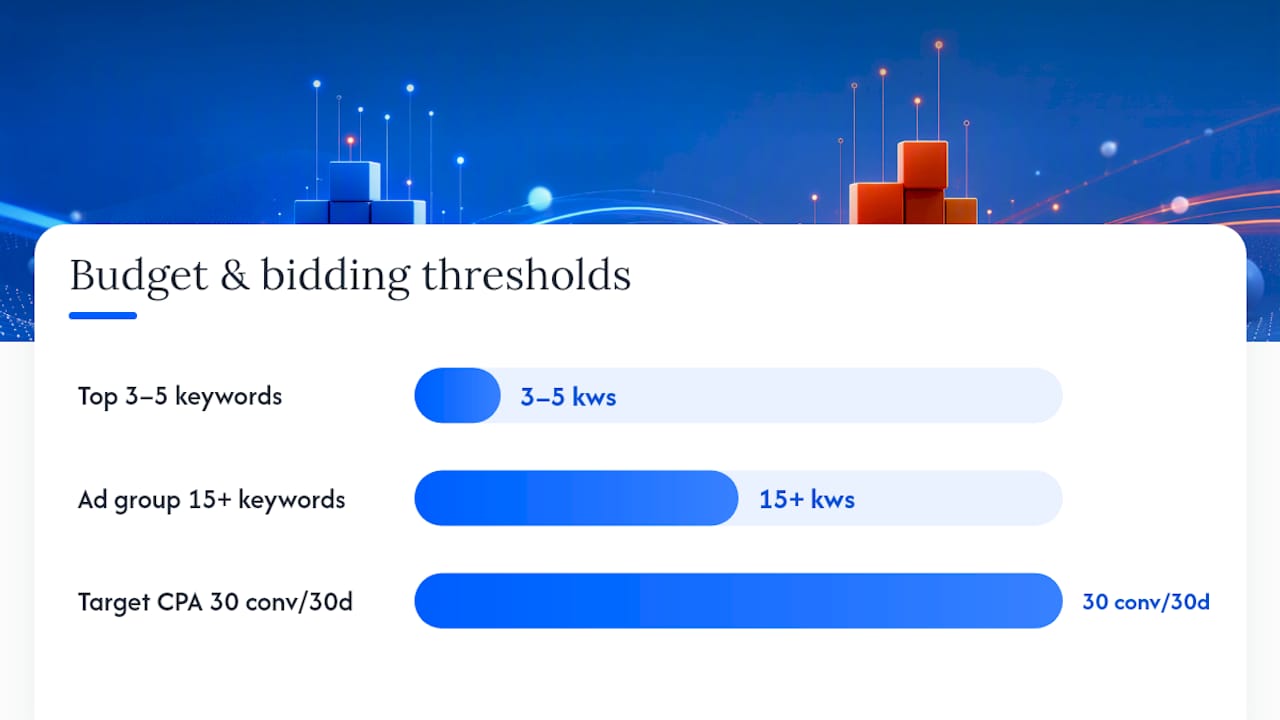
Sometimes the ads, keywords, and landing page are all fine — the problem is structural. Budget constraints, bidding strategies set too early, or a campaign structure that splits budget across too many ad groups can all suppress conversions.
Decision guidelines:
Smart Bidding is effective only when the account counts real business outcomes as primary conversions. If your primary conversion action is a micro-event like a page scroll or a video view, automated bidding will optimise toward those events — not toward phone calls or form submissions. Fix the conversion hierarchy first, then consider switching bidding strategies.
Priority flags:
Pausing too early is one of the most common mistakes in Google Ads management. Campaigns need data before they can perform, and Smart Bidding needs time to learn after any significant change.
For businesses with long sales cycles (consulting, professional services, high-ticket B2B), extend your conversion window to 60–90 days in Google Ads settings. A prospect who clicked your ad in week one might not enquire until week six. A 2026 practitioner guide for Australian businesses recommends prioritising conversion optimisation over increasing ad spend when performance is unclear — more budget into a broken funnel just amplifies the problem.
Testing without a structure produces noise, not insight. A simple hypothesis-driven approach keeps tests useful.
In Google Ads Experiments, the results panel shows conversion rate, cost per conversion, and a confidence indicator for each variant. In GA4, use the Explore tab to compare sessions, engagement rate, and goal completions between the two landing page URLs during the test period.
A/B test ideas to run first:
When running experiments, avoid making simultaneous changes to bids, budgets, or targeting. Each change resets Smart Bidding’s learning period. Run one experiment at a time, and wait for the learning period to settle before starting the next test.
For post-conversion nurture, improving email conversion rates is a natural next step once your ads are generating enquiries consistently.
This plan is built for small business owners who want to fix their own campaigns or hand a clear scope of work to someone they trust. Each phase has a focus, specific actions, and a measurable outcome.
Focus: Stop the bleeding. Fix tracking, remove wasted spend, and make the landing page work.
What success looks like: Conversion tracking is active and verified. At least one conversion records in the first two weeks. Irrelevant search terms drop by more than half.
KPIs to watch: Conversion status (active/inactive), number of conversions recorded, search term relevance score (manual review).
Focus: Run controlled tests, tighten keyword targeting, and let Smart Bidding learn from clean data.
What success looks like: A/B test produces a clear winner. CPA is trending down.
KPIs to watch: CPA, conversion rate by device, CTR by match type.
Focus: Put more budget behind proven winners, implement CRO insights across the site, and measure real business outcomes.
What success looks like: ROAS is measurable and improving. Phone leads are tracked.
KPIs to watch: ROAS, CPA, phone call conversions, revenue per campaign.
For a broader view of how to turn website visitors into paying clients, the same principles of tracking, message match, and iterative testing apply across your whole digital presence.
If you’ve run through this checklist and still feel like you’re missing something, the problem is usually one of two things: the tracking setup is more tangled than a quick fix can solve, or the offer and messaging need a proper rethink, not just a headline swap.
Mybworkshops’ Ads That Convert workshop is built specifically for service-based business owners who are spending money on Google Ads and not seeing results. The workshop walks you through conversion tracking validation, landing-page message match, keyword intent, and a test-and-scale framework you can apply immediately. You leave with a checklist, templates, and a clear picture of what to fix first. It’s practical, structured, and designed so you can implement it yourself or hand it to someone with confidence. Browse the full workshops programme to find the right starting point for where your business is right now.
The most common causes are broken conversion tracking, a landing page that doesn’t match the ad’s promise, or keywords attracting informational rather than buying intent. Run the conversion tag check and Search Terms report first — those two steps identify the problem in most accounts.
High clicks with zero conversions usually means one of three things: your tracking tag isn’t firing correctly (so conversions are happening but not recording), your landing page isn’t convincing visitors to act, or your keywords are pulling in people who are researching rather than ready to buy. Check GA4 Realtime during a test conversion to confirm whether tracking is the issue.
Your budget continues to spend, your Quality Score can decline if CTR drops, and Smart Bidding learns from the wrong signals — making future performance worse, not better. Pausing campaigns that aren’t converting is better than letting them run and pollute your account data.
Targeting gets people to the page; the page has to do the rest. If your audience, location, and keywords are well-configured but conversions are still low, the problem is almost always the landing page: slow load time, weak headline, missing trust signals, or a form with too many fields. A focused landing page audit usually reveals the specific friction point within an hour.