

Heatmap analysis shows where people click, scroll and move on your pages so you can spot friction and create testable improvements. It’s genuinely useful for site owners who want to understand user experience and lift conversions, not just guess at what’s working. The next step is simple: run heatmaps on your priority pages, then check what you find against your analytics and a handful of real user sessions.
TL;DR:
- Heatmaps reveal user attention hotspots, dead clicks, and scroll drop-off points, but do not explain the reasons behind visitor behavior.
- Avoid making conclusions from heatmaps alone by pairing them with other research methods, such as user sessions or surveys.
- Focus heatmap analysis on high-impact pages like homepages, landing pages, and critical conversion forms for better results.
- Privacy compliance requires explicit consent and transparent disclosure when using tracking pixels, especially on sensitive or health-related pages.
- Turn heatmap insights into hypotheses for testing, prioritizing quick, impactful fixes and documenting results to improve website conversion rates.
A heatmap turns raw visitor behaviour into a colour-coded picture of your page. Warmer colours (reds and oranges) show the busiest areas, while cooler colours (blues and greens) show the quiet patches. It’s a visual shortcut: instead of scrolling through spreadsheets, you see at a glance where attention is going.
There are several types, and each one tells you something different:
Click maps are best for checking whether your calls-to-action are being noticed. Scroll maps are best for long pages like service descriptions or blog posts, where you need to know if anyone reaches the bottom.
Used well, heatmaps are brilliant at surfacing hotspots, dead clicks (where people click on something that doesn’t respond) and the exact point where scroll drop-off happens. They also catch surprises, like visitors clicking on an image you never meant to be interactive.
What they don’t do is explain why people behave that way. Mouse movement is not the same as eye gaze: a study tracking eye, mouse and scroll movement across 151 participants found the two correlate for general movement but diverge during moments of actual fixation. That means a mouse-based heatmap is a coarse signal, not a direct read of attention.
Small sample sizes, seasonal traffic swings and the source of your traffic (ads versus organic search, for instance) can all skew results too. The fix is simple: treat heatmaps as the “what” and pair them with other research for the “why”, which is exactly what the Australian Digital Service Standard recommends when it comes to understanding users properly.
You don’t need an agency or a big budget to run a solid heatmap analysis. A small business owner with a few hours a week can work through this checklist.
A systematic review of heatmap usage in usability testing found this kind of repeatable workflow, plan, collect, analyse, test, record, helps smaller teams convert raw heatmap data into measurable change without needing specialist help.
Pro Tip: Give each test page at least a few weeks of steady traffic before drawing conclusions, otherwise you’re reading noise, not behaviour.
Not every page is worth the same scrutiny. Start where the business impact is highest:
Within those pages, focus on hero calls-to-action, navigation menus, form fields and any image or icon that looks clickable but isn’t. Match your page choice to your actual conversion funnel: a heatmap on a page nobody visits won’t tell you much worth acting on.
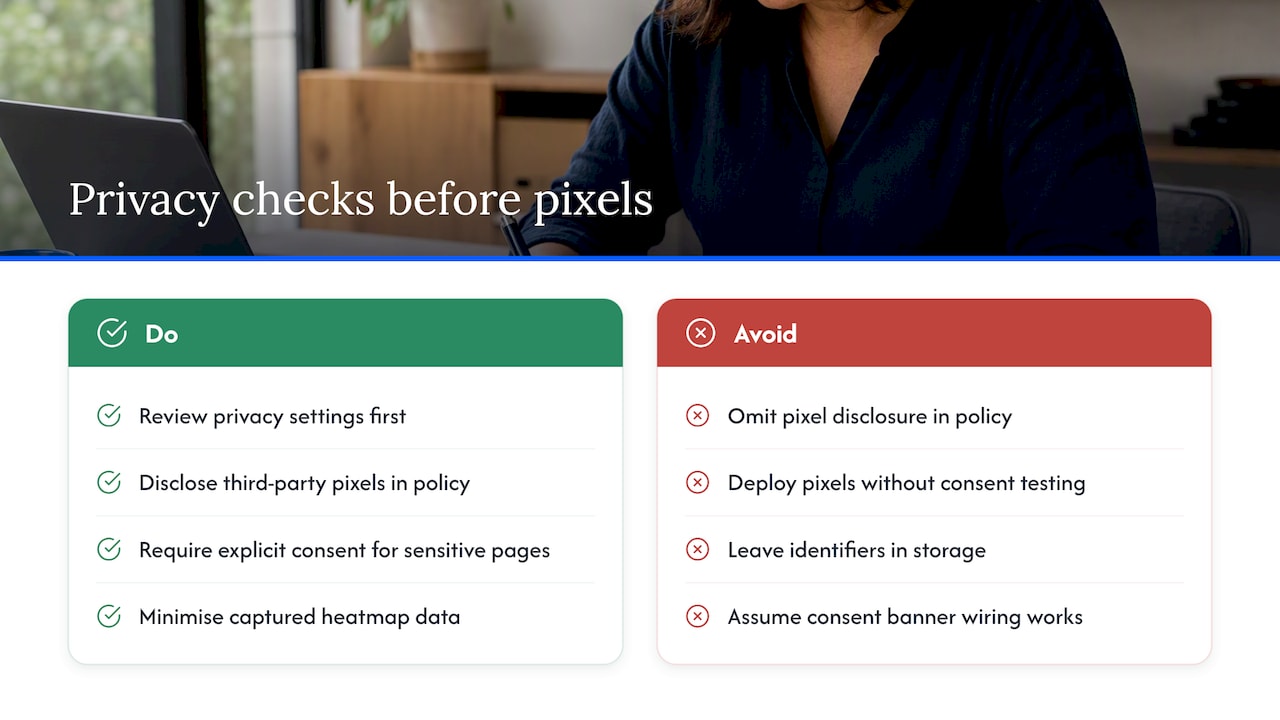
Before you install anything, check your privacy settings. The OAIC’s guidance on tracking pixels requires organisations to disclose third-party pixels in their privacy policy and to configure them carefully, with explicit consent needed wherever sensitive information might be involved.
Only a small share of organisations reference pixel use in their privacy policies: the OAIC’s review found very few entities actually did this, which shows how often this gets missed. The OAIC’s separate investigation into tracking pixels also flagged that pixels on health-related pages can pick up sensitive information, so explicit consent matters even more on those pages.
Practical steps: minimise what data your heatmap tool captures, keep a simple register of every tracker on your site, and test what happens when a visitor clicks “reject all” versus “accept all” on your consent banner. A quick audit using your browser’s developer tools, or a cookie consent and CMP wiring check, can confirm no identifiers linger in storage after someone opts out.
A heatmap finding is only useful once it becomes a hypothesis you can test. If scroll data shows most visitors drop off before your pricing section, the hypothesis might be “moving pricing higher on the page will reduce bounce before the call-to-action.”
Prioritise your list of hypotheses by impact and effort, tackling the changes that are cheap to make and likely to move the needle first. Run proper A/B tests where traffic allows, and lean on session recordings to check your interpretation against what actually happened on screen. Keep a central register of every test, what you changed, and what the result was: this stops you repeating the same experiment twice and builds a record you can learn from over time. Our conversion rate optimisation workflow guide walks through this process in more depth if you want a template to follow.

Reading heatmap data is only half the job: turning it into a better website takes structure. The Plan a Website That Converts workshop walks through strategy, structure and UX decisions that heatmap findings often point to, backed by templates and mentoring rather than guesswork.
If you’d rather learn this properly than stitch it together from scratch, the Plan a Website That Converts – Strategy, Structure & UX Workshop teaches you how to read heatmap data, prioritise fixes and apply them within a broader conversion system, with templates and mentorship instead of trial and error. It’s an educational alternative to DIY learning, built for business owners who want guidance, not another tool to figure out alone.

Browse the full workshop lineup to see which session fits where you’re at.
Install a heatmap tool on your site, let it collect data for a few weeks, then view the click, scroll or hover map inside the tool’s dashboard. Segment results by device and traffic source before drawing conclusions, since mixing audiences can hide real patterns.
ChatGPT can’t generate a heatmap from your actual website traffic because it has no access to visitor behaviour data. It can help you interpret a heatmap you’ve already collected or draft hypotheses based on what you describe, but the data itself has to come from a heatmap tool installed on your site.
A website heatmap is a colour-coded visual that shows where visitors click, scroll or move their cursor on a page. Warmer colours indicate higher activity, helping you spot which sections get attention and which get ignored.
There’s no single best option for every business: the right choice depends on your budget, your platform and whether you need session recordings alongside heatmaps. Look for a tool that lets you segment by device and traffic source, and that is transparent about what data it collects, in line with OAIC guidance on tracking pixels.